Instant Futurism: Using the Holographic Backgrounds Bundle
In the world of digital content, stopping the scroll is half the battle. Whether you are a graphic designer working on a tight deadline, a small business owner refreshing your Instagram feed, or a marketer creating assets for a new campaign, the pressure to look "current" is immense. Right now, the aesthetic of the future—specifically the iridescent, shifting colors of the metaverse and Y2K revival—is dominating visual trends. However, creating these complex, multi-chromatic gradients from scratch is time-consuming and often frustrating. This is exactly where a robust collection of design assets becomes not just a luxury, but a necessity for maintaining a competitive workflow.
The Anatomy of the Collection
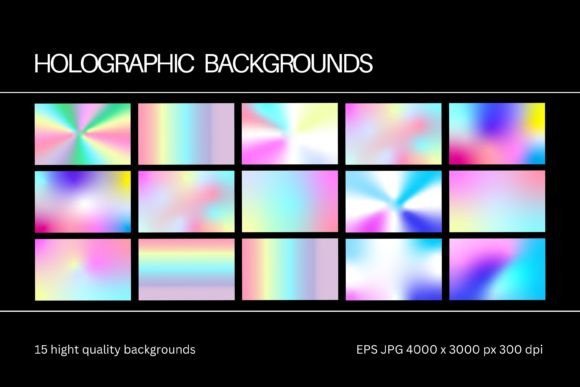
When you download the Holographic Backgrounds Bundle, you aren't just getting a random assortment of colorful files; you are acquiring a structured toolkit built for professional versatility. The collection includes 15 distinct holographic backgrounds, each designed to mimic the light refraction and fluidity of physical foil or digital chrome. The package arrives as a single, organized zip file containing two specific folders to ensure compatibility across your entire software suite.
The first folder contains JPG files at a substantial 4500 x 3000 pixels with a resolution of 300 dpi. This specification is critical. While many free resources offer 72 dpi web-only graphics, this bundle provides high-resolution files suitable for print. Whether you are designing a magazine cover, a physical poster, or packaging, the 300 dpi quality ensures that your gradients remain smooth and free of pixelation artifacts. The second folder contains EPS files, which are the true workhorses for professional designers. These vector-based files allow for infinite scalability without quality loss, making them essential for large-format printing or logo design where sharpness is paramount.
Visual Appeal and Aesthetic Personality
The "personality" of the Holographic Backgrounds Bundle is best described as ethereal, modern, and energetic. These backgrounds capture the essence of modern typography trends where the background does as much work as the foreground text. You will find soft pastels blending into neon peaks, creating a sense of movement and depth that flat colors simply cannot achieve.
This style leans heavily into the "glassmorphism" and "neomorphism" trends seen in current web design and app interfaces. The holographic effect provides a textured, tactile feel to digital screens. It suggests innovation and technology, making it an ideal match for tech startups, beauty brands looking for a futuristic edge, or content creators in the gaming and streaming space. It is a creative font partner—meaning it serves as the perfect canvas for typography to pop against, provided the typeface is chosen wisely.
Strategic Applications Across Industries
The utility of this bundle spans far beyond simple desktop wallpapers. For the entrepreneur and marketer, these files are a gateway to elevated brand identity. In a saturated market, visual consistency is key. By utilizing these backgrounds across your social media graphics, you create an immediate visual hook that audiences associate with your brand's energy.
Consider the following practical applications:
- Logo Design and Branding: Use the EPS files to create holographic overlays on logos. This is particularly effective for beauty, fashion, and tech industries. It adds a premium feel to your brand identity without needing to hire a 3D artist.
- Editorial and Packaging Design: If you are working on packaging design for a cosmetic product or a luxury item, these backgrounds simulate the iridescent foiling techniques often used in high-end printing. You can mock up your designs instantly to show clients how the final product will catch the light.
- Digital Content Creation: For bloggers and YouTubers, these assets work wonders for thumbnails, channel art, and lower thirds. The high-contrast nature of holographic gradients ensures that text remains legible while grabbing attention in a crowded feed.
Technical Flexibility and Customization
One of the strongest selling points of this collection is its adaptability. The files are optimized for ease of use in major industry-standard software. Whether you are a seasoned pro in Adobe Illustrator or a business owner using Canva for your daily posts, the workflow is seamless.
Because the bundle includes EPS vectors, you have full control over the color palette in Adobe Photoshop and Adobe Illustrator. If the default pink-to-blue gradient doesn't fit your brand guidelines, you can easily manipulate the nodes and colors to match your specific hex codes. Furthermore, the files are fully compatible with Figma, allowing UI/UX designers to integrate these backgrounds directly into their wireframes and prototypes. This level of customization ensures that the asset never feels like a stock image, but rather a bespoke element of your design system.
Pairing and Typography Considerations
When working with such a vibrant background, your choice of typography becomes the deciding factor in readability. A common mistake is pairing a busy holographic background with a complex script font or a thin serif font. The visual noise of the background can swallow the delicate strokes of these typefaces.
Instead, consider the following pairing strategies to maximize visual hierarchy:
- Bold Sans Serifs: A heavy, geometric sans serif font is the safest and most impactful choice. The thick letterforms create a solid silhouette that floats above the shifting colors. This combination works exceptionally well for headlines in web design and posters.
- Monospaced Fonts: To lean into the futuristic, tech-forward vibe of the holographic style, a monospaced typeface creates a "digital terminal" aesthetic that feels very cohesive.
- Outline Typography: Using an outlined version of a display font allows the holographic colors to show through the letters themselves. This is an advanced technique that creates stunning cover art or hero images.
Always test your text over the areas of the background with the most contrast. If you are placing white text over a light purple peak, it will disappear. Use drop shadows or subtle dark overlays if you must place text over low-contrast areas, though it is generally better to reposition the text to a darker region of the gradient.
Evaluating Fit and Licensing
Before integrating any asset into a commercial project, it is vital to understand the scope of use. This Holographic Backgrounds Bundle is designed for versatility, covering both personal hobbies and commercial ventures. Whether you are creating merchandise to sell on Etsy, designing client work as a freelancer, or building internal assets for a corporate presentation, the files are equipped to handle the load.
When evaluating if this style fits your project, ask yourself: Does my brand promise innovation, futurism, or luxury? If the answer is yes, this bundle is a strong candidate. However, if your brand relies on earthy, organic, or vintage aesthetics, the high-gloss finish of holographic gradients might clash with your existing visual language.
To get the most value, treat these backgrounds as foundational layers. They are not just "pictures"; they are lighting effects. You can layer textures, typography, and photography on top of them to create complex compositions that look like they took hours to render. By downloading this collection, you save significant production time while elevating the production value of your visual communications.